Home › BUSY Guides › GSTR-2A / 2B Reconciliation in BUSY, Step by Step
GSTR-2A / 2B Reconciliation in BUSY, Step by Step
BUSY में GSTR-2A / 2B डाउनलोड, मिलान और छूटे खरीद बिल इम्पोर्ट: पूरा तरीका
How to download GSTR-2A / 2B in BUSY, reconcile it with your purchase bills and import the missing bills into BUSY in one go, with screenshots and a Hindi video.
Step 1: download GSTR-2A / 2B inside BUSY
As given in BUSY's help on busy.in:
Transaction menu
Open Transaction > GST Misc. Utilities > Download GSTR JSON Data.
Download GSTR-2B (or 2A)
Choose Auto download, click Download beside the month and enter the OTP sent to your registered mobile. The status shows Saved.
Or manual
Choose Manual and browse to the file you downloaded from the GST portal, month by month.
Auto download and GST reconciliation need an active BLS / plan with GST services. Renew BLS if they stop working.
Step 2: find the bills that are on the portal but not in BUSY
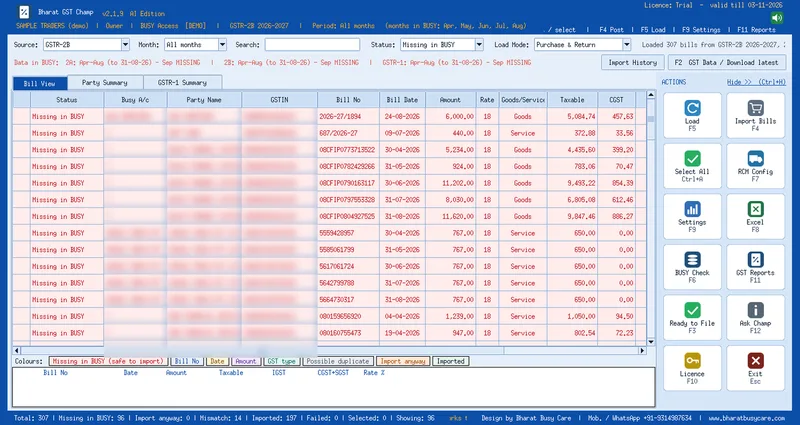
The hard part is not downloading; it is finding which supplier bills are missing in your books, which differ in bill number, date or amount, and which are possible duplicates. That is what Bharat GST Champ does inside BUSY 21:
- F2 shows which months of 2A, 2B and GSTR-1 are already downloaded in BUSY and which are missing
- F5 Load matches every portal bill with BUSY and colours it: Missing in BUSY (safe to import), bill no., date or amount mismatch, possible duplicate, imported
- Pick one month, all months, several months or a bill-date range
- A detail strip shows the portal bill and the BUSY bill side by side
Step 3: import the missing bills into BUSY
- Ctrl+A selects only the bills that are safe to import
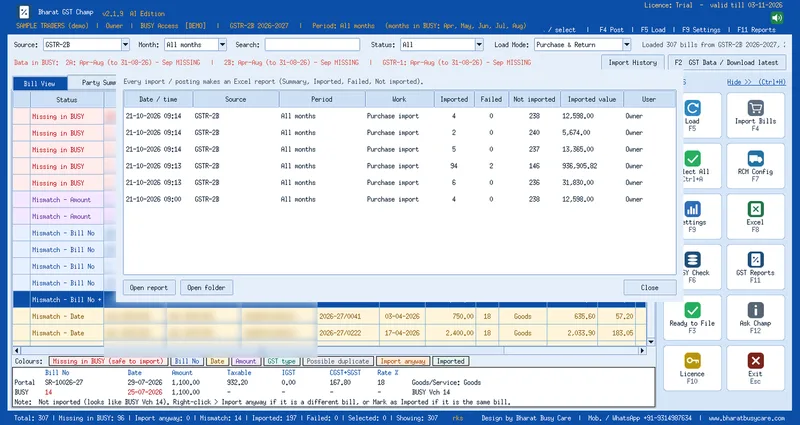
- F4 shows how many bills, Purchase / Return / RCM and the company, and imports only after you confirm
- New suppliers are created from the GSTIN with the right state; items are picked by GST rate
- Every import saves an Excel report, and Import History (Ctrl+I) lists the last 10
- Source GSTR-1 does the same for sales: posts sales that are on GSTR-1 but missing in BUSY
Watch the full Hindi demo video on the Bharat GST Champ page and start the free 15-day demo.
Updated 2026-10-21 · Bharat Busy Care, BUSY partner, Sri Ganganagar
FAQ
Where is GSTR-2B download in BUSY?
Transaction > GST Misc. Utilities > Download GSTR JSON Data > Download GSTR2B, then Auto download with OTP or Manual with the portal file.
Can BUSY import missing GSTR-2A bills as purchase vouchers?
Bharat GST Champ, an add-on for BUSY 21, lists bills that are on GSTR-2A / 2B but missing in BUSY and posts them as purchase vouchers after you confirm.
Will the tool post anything without asking?
No. Every import shows a summary first and posts only after you click Yes. Take a BUSY backup before the first import.
Is there a free trial?
Yes, Bharat GST Champ has a 15-day free demo with Google sign-in.
Talk to a BUSY expert
Call or message us; we answer in Hindi or English.